I have watched a back injury end a competitive career at 24, so I do not treat chairs as furniture. A gaming chair setup for long sessions comes down to three adjustments almost nobody touches: seat depth, lumbar height, and tilt lock. Get those wrong and an expensive chair hurts exactly as much as a cheap one.
Ten years of ten-hour practice days taught me the rest. The difference between a chair you can sit in for eight hours and a chair you cannot has nothing to do with the logo stitched into the headrest. It is whether the lumbar support actually moves, whether the tilt locks at an angle that keeps your hips above your knees, and whether the armrests rise to meet your desk instead of your shoulders dropping to meet them.
Below is the setup order I run on every chair that comes into the team house, followed by two chairs at very different price points that are worth a look: a plain budget model and the racing style chair people keep buying anyway. The workflow is free. The chair is the only part that costs money.
Why you should trust me
I am Jae, an esports coach in Los Angeles, and I spent a decade as a competitive FPS player before that. Ten-hour practice days were normal. Chairs were not something I thought about until one collapsed mid-match and another gave me a disc scare that scared me straight. I have been through more chairs than I have trophies, and I have a physical therapist to thank for teaching me what support actually means.
Now I coach full time, and I make my players sit properly, because I learned the hard way that back pain ends careers faster than a bad meta does. My rules are simple and they apply to a $90 chair the same way they apply to a $900 one: if it does not support your back in hour six, it is a toy. Lumbar support you can adjust beats lumbar support that looks cool. Mesh beats leather for anyone who plays more than two hours at a stretch.
How I judge a chair before anyone sits in it
Four questions, in this order. If a chair fails the first one, I stop reading the listing.
One: does the lumbar support move? A fixed bump in the backrest is decoration. You want a pad or a curve that slides up and down, because the small of your back is not in the same place as the small of mine. Bolted-in lumbar is the single most common failure on cheap chairs, and it is the reason so many people describe their chair as "fine for an hour."
Two: can you lock the tilt? A chair that only rocks freely is a nap chair. You need a lock that holds a fixed recline angle and a tension dial that lets you lean back without fighting the chair or sliding forward. The healthy angle for desk work is roughly 100 to 110 degrees of recline, not bolt upright at 90.
Three: do the armrests adjust in more than two directions? Up and down only is not enough. You want height, angle, and ideally in and out, so the pads meet your forearms at elbow height while your shoulders stay relaxed. If raising the armrests makes your shoulders climb, the chair is wearing you, not supporting you.
Four: how deep is the seat, and how does the material behave in heat? Seat depth should leave two or three fingers of space behind your knee. Too long and the edge digs into your calves. Too short and your thighs hang. On materials, leather looks better in photos and runs hotter in July, and a hot back is a slouched back. Mesh is boring and it wins.
Everything else, the colors, the racing stripes, the headrest pillow, is preference. Buy on the four questions above.
The two chairs worth a look right now
Here is the honest state of the market at the two ends of it. One is a straightforward budget model that gets the fundamentals close to right, and one is the race-car-looking chair that people buy for the look.
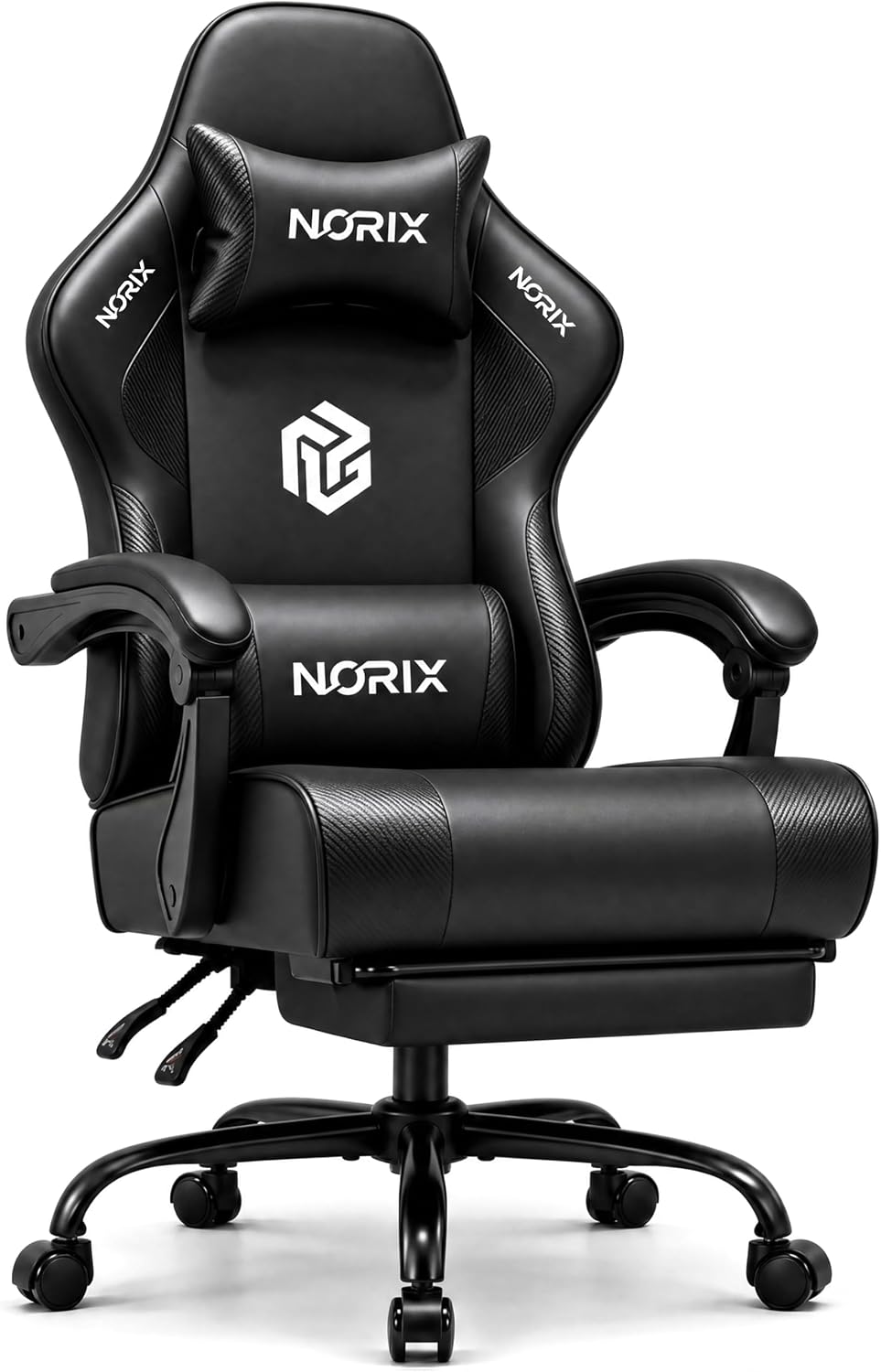
Best value: Gaming Chair for Adults Gamer Game Chair PC Chair Upgraded Gaming Chair
 Visit on Amazon →
This is the chair I point people to when they want a first real gaming chair without spending like it is a piece of furniture. The name says "upgraded," and what that buys you is the standard loadout: a height-adjustable gas lift, a reclining backrest, padded armrests, and a lumbar cushion you can actually reposition instead of a bump molded into the shell.
Before you buy, verify two things on the listing page, because this class of chair varies between batches. First, check whether the armrests are described as adjustable and in which directions. Height-only armrests are common at this end, and if that is all they do, plan on setting your desk height around the chair rather than the other way around. Second, look at the weight rating and the seat dimensions against your own height. A chair that fits a 5-foot-6 player and a chair that fits a 6-foot-2 player are not the same chair, and the description is where you find out.
Check current Amazon price, and note that the number moves around sale events, so it is worth watching for a week rather than buying on impulse.
Flaws but not dealbreakers: Chairs at this price point use more plastic in the base and the armrest caps, so they can develop a wobble after a year or two of hard use. The included lumbar cushion is also thinner than a dedicated lumbar mechanism. Neither is a reason to skip it if the budget is real, and both are fixable. Tighten the base bolts monthly and replace the cushion with a firmer one when it flattens.
Anyone buying a first chair for a teenager, a second setup for a streaming corner, or a spare rig for the guest room will be happy here. If you sit eight hours a day, five days a week, keep reading.
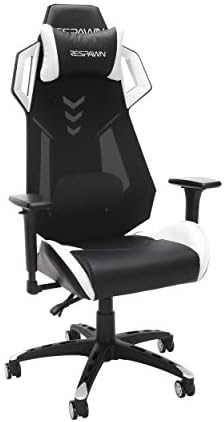
The racing look: RESPAWN RSP-200 Racing Style Gaming Chair, Leather, White
 Visit on Amazon →
I make fun of racing chairs, and then I sit in one and admit the white leather looks great. That is the honest tension with this style. The bucket-seat shape came out of car interiors, and bolsters that wrap your torso are useful when you are cornering at speed, not when you are sitting still at a desk for six hours. This one wears it in white leather, which is a genuinely sharp look in a bright room.
The shape is not automatically a death sentence, though. What matters is what is underneath the styling. Before you commit, check three details on the listing. Does the lumbar support move up and down, or is it a strap-on pillow? Do the armrests adjust in more than up and down? And does the chair lock at a recline angle you can hold for an hour? If the answers are yes, yes, and yes, the bolsters are a cosmetic cost you are choosing to pay.
The real caveat is heat. Leather, and especially leather with foam padding and side bolsters, traps heat against your back. In a Los Angeles summer, with the AC off and a ranked grind running, that is the difference between sitting up straight at hour four and sliding down into a slouch. If your room runs warm or you play more than two hours at a stretch, mesh is the smarter material and there is no way around it.
Check current Amazon price before you order, since this model has been on the market long enough that pricing shifts with the season.
Flaws but not dealbreakers: Leather needs care, so wipe it down or it will crack where your shoulders and elbows rest. The bolsters will push your arms slightly forward, which is fine for a controller and less fine for a mouse and keyboard. And the white is unforgiving, so keep it away from anyone who eats at their desk.
Anyone who wants the esports look, plays in a cool room, and keeps sessions under a couple of hours will get exactly what they paid for. Anyone with a history of lower back trouble should pick a chair with a real adjustable lumbar mechanism, racing stripes or not.
The actual setup workflow
Now the part that matters more than the chair. This works on any gaming chair with an adjustable backrest and a lockable tilt. Twenty minutes, once, and you stop thinking about your back.
Step one: set the height first. Stand up, then sit down and adjust until your knees are level with your hips or slightly below. Feet flat on the floor, not dangling, not tucked under the seat. If your feet do not reach, get a footrest or a box. This is the step people skip and it wrecks everything downstream.
Step two: set seat depth. Sit all the way back so your hips are against the backrest. You want two to three fingers of space between the front edge of the seat and the back of your knee. If your chair has a seat slider, use it. If it does not, you may need to accept a slightly reclined backrest angle to shorten the effective depth.
Step three: place the lumbar support at belt line. This is the one that changes everything. The curve belongs in the small of your lower back, right around the height of your belt, not up under your shoulder blades. Slide it up and down until you feel it fill the gap between your spine and the backrest with no pressure points. If it hurts, it is in the wrong place, not too firm.
Step four: lock the tilt and set the tension. Recline the backrest to about 100 to 110 degrees. That open angle takes load off your discs. Lock it there. Then set the tension dial so leaning back is easy but the chair does not fling you backward.
Step five: dial the armrests. Elbows at 90 degrees, shoulders down and relaxed. Raise or lower the armrests until the pads meet your forearms just below the elbow. Then angle them so your wrists stay neutral and your mouse hand is not reaching forward all day.
Step six: forget the headrest during work. A headrest is for reclining between matches, not for daily posture. If you are leaning your head back to find comfort, your neck is already tired, and the fix is a break, not a pillow.
Step seven: take the break before you need it. Every 30 to 45 minutes, stand up, walk to the kitchen, and reset. Recline fully for two minutes if your chair allows it, then come back to your locked angle. The best chair in the world cannot beat a spine that never moves.
Step eight: manage heat. If your back is sweaty, your posture has already lost. A mesh chair solves this. A leather chair needs airflow, a cooler room, or shorter sessions. Put a small fan behind the chair if you refuse to give up the leather.
What I skipped and why
Two categories I will not put in a buying guide. The first is any chair with lumbar support molded permanently into the shell, because it fits exactly one body type and there is no adjustment to fix it. The second is armrests that only go up and down, because if your elbows do not land at the same height as your desk, your shoulders pay for it all day.
I also skipped the giant recliner-style gaming thrones. They look comfortable and they put you in a posture that is closer to a couch than a workstation. If you already own one, the setup steps above still help, but a recliner is a place to watch a movie, not a place to run scrims.
What this all costs
The setup itself costs nothing but the discipline to do it once. The chairs are the variable. Both of the models above will show you Check current Amazon price on the listing, and both numbers move with sales, so the gap between the budget pick and the racing chair narrows considerably on a holiday weekend.
Here is how I think about the money. The budget chair gets you the function, a height adjustment, a reclining back, and a repositionable cushion, at the lowest entry price. The racing chair charges you for materials and looks, leather and a silhouette, and gives you the same basic adjustments underneath. Neither one is a waste if you know which of those two things you are actually buying.
What is a waste is spending on either chair and then leaving the lumbar cushion wherever it shipped and never locking the tilt. That is the expensive mistake, and it costs the full price of the chair.
The bottom line
Sit properly or do not sit long. Set your height, set your depth, put the lumbar curve in the small of your back, lock the tilt at 100 to 110 degrees, and put your elbows where your desk already is. Do that and a mid-priced chair will outlast your rank. Skip it and a racing throne will put you in physical therapy.
Take twenty minutes tonight. Your back in hour six will know the difference.