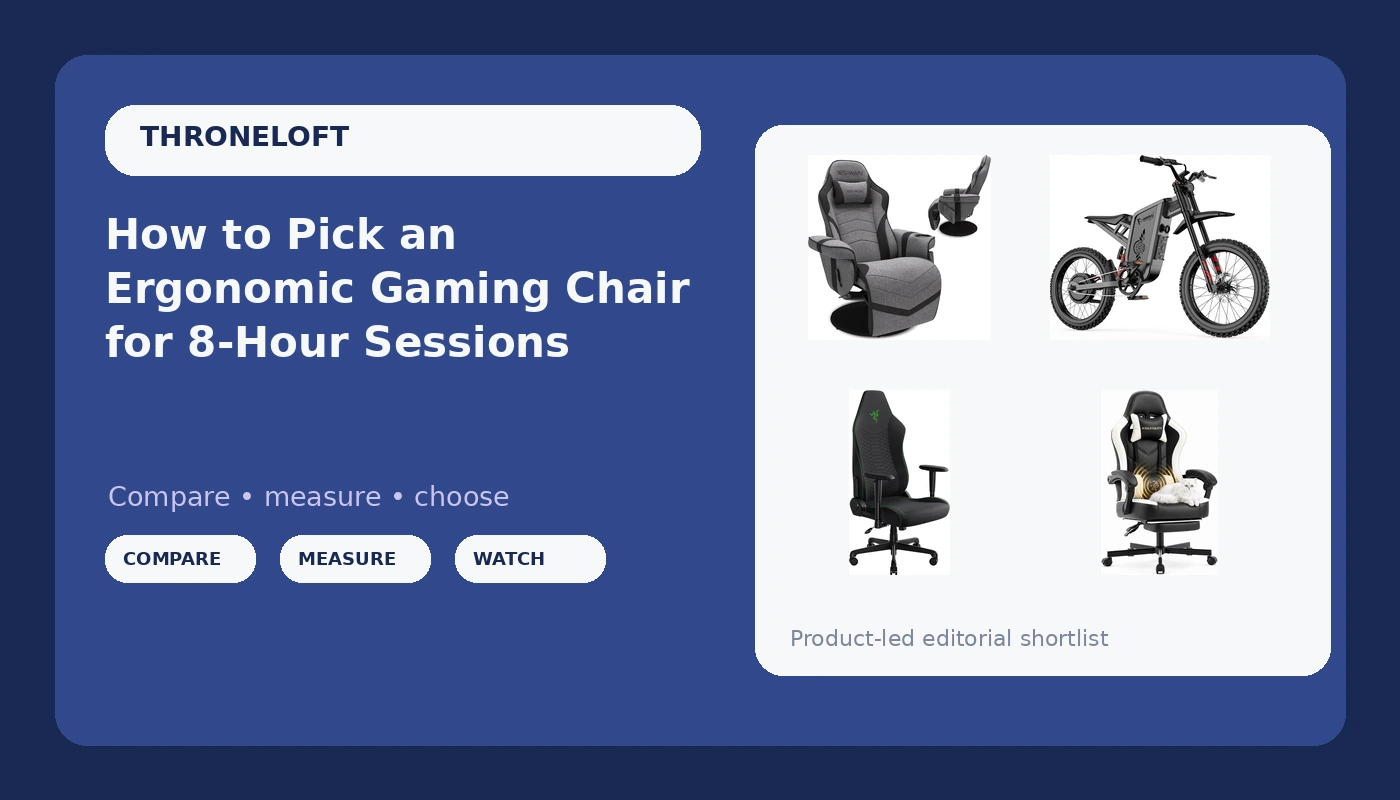
A gaming chair is a chair first and a gaming product second. That sounds obvious until hour six of a scrim block, when you are hunched forward because the lumbar bump sits in the wrong place, the armrests only go up and down, and the seat is an inch too long for your legs. Shopping for an ergonomic gaming chair is really a posture decision wearing a product label, and the box copy rarely helps you make it. What follows is a look at four items currently listed in the ThroneLoft catalog, what each one is genuinely for, and the checks I run before anyone on my roster sits in a chair for a full practice day.
Related: Mesh vs Leather Gaming Chairs: What Your Back Notices →
Quick answer
If your priority is an ergonomic gaming chair for upright desk work, start with the Razer Iskur V2 X, because it is the only dedicated ergonomic gaming chair in this group. If you want to lean back between matches rather than sit up, the RESPAWN 900 is a recliner and should be judged as one. If you want a high-back desk chair with a built-in footrest, the white leather high-back chair matches that brief. And if you were actually shopping for an off-road electric bike, the Freego X2Pro is the one item here that is not seating at all. Fit is personal, so confirm the return window before you commit.
4 useful options
| Model | Best fit | What stands out |
|---|---|---|
| Razer Iskur V2 X Ergonomic Gaming Chair, Black | Upright desk sessions and posture-first setups | High-back ergonomic gaming chair design in black |
| Desk Computer Gaming Chair (White Leather) | Desk seating with somewhere to put your feet | High back with footrest, lumbar support, pocket spring cushion, swivel base |
| RESPAWN 900 Gaming Recliner Chair | Leaning back between matches and console play | Recliner with footrest, cup holder, and swivel |
| Freego X2Pro Electric Motorcycle for Adult | Off-road riding, not seating | 6000W peak motor, 60V/30Ah battery, full suspension, four-piston hydraulic brakes, UL 2849 certified |
The ergonomic pick: Razer Iskur V2 X Ergonomic Gaming Chair, Black
Two things to verify before you buy. First, seat depth: measure from the back of your knee to the back of your hip while sitting, and compare that to the seat. Too long and the front edge digs into your calves, too short and your thighs hang. Second, armrest travel. A chair that adjusts in three or four directions lets you bring the rests to your elbows instead of dropping your shoulders to meet the rests. If the armrests only go up and down, you are compromising on every long session.
The desk chair with a footrest: Desk Computer Gaming Chair, White Leather
The trade-off here is material. Leather and leather-look upholstery hold heat, and a white finish shows every mark from a black hoodie or a can of soda. The footrest is a real benefit for anyone who likes to shift leg position mid-session, but it also adds a mechanism that can loosen over time, so check the warranty before you rely on it. The listing does not spell out whether the lumbar support slides or stays fixed, so treat it as a fixed shape and confirm before buying if adjustability is non-negotiable for you.
The recliner: RESPAWN 900 Gaming Recliner Chair
Reclining feels great and it solves a real problem, which is that sitting still in one position for hours is hard on your back. The catch is what happens to your neck when you recline and keep looking at a monitor. If the screen stays at desk height while your torso drops back, you end up with your chin forward and your cervical spine doing the work your chair should be doing. Recliners make sense for controller play on a TV at the right height. For keyboard and mouse work, they usually lose to a proper desk chair.
The outlier: Freego X2Pro Electric Motorcycle for Adult
If you are reading this for chair advice, that entry is not for you. If you genuinely came looking for an off-road electric bike, the practical notes are the boring ones: budget for a helmet and body armor, check what is street legal where you live, and treat the stated top speed as a closed-course figure rather than something to chase on a public road.
Prices and availability may change. Product images, names, and retailer links must be matched by verified ASIN. Do not state a current price, rating, stock status, or measured result without current evidence.
What actually makes a chair ergonomic
Lumbar support is the first thing to interrogate, and adjustability is the whole game. A fixed bump pushes your lower back into whatever curve the manufacturer picked, which may be nowhere near your spine's natural lordotic curve. An adjustable pad lets you raise or lower the contact point and dial in how much pressure it applies. If you cannot change it, you are not getting support, you are getting decoration that happens to be shaped like support.
Seat depth is the second. Sit all the way back against the backrest and check the gap between the front edge of the seat and the back of your knees. You want roughly two to three fingers of clearance. Less than that and the edge presses into your calves and cuts circulation. More than that and you will slide forward to get your legs comfortable, which defeats the backrest entirely.
Tilt tension and tilt lock are the third. A serious chair lets you lean back and lock at an angle you can hold, and it lets you tune how much force it takes to recline. Sitting at one fixed angle for eight hours is worse for your back than moving through a small range, so a chair that lets you rock slightly or lock at 100 to 110 degrees is doing real work for you.
Armrests are the fourth, and they are the most commonly ignored. Your elbows should rest at roughly ninety degrees with your shoulders relaxed. If the rests are too low, you drop your shoulders. Too high, and you shrug. Armrests that adjust up and down, in and out, and angle forward and back let you match the chair to your body instead of the other way around.
Finally, seat height. Feet flat on the floor, knees at about hip height or slightly below. If your feet dangle, you need a footrest. If your knees come up above your hips, the chair is too low and your pelvis rolls backward.
Mesh, leather, and the six-hour heat problem
Upholstery is where most buyers get distracted by looks. Leather and leather-look materials look sharper in photos and feel warmer in practice, because they do not move air. After a couple of hours, that trapped heat becomes moisture, and moisture plus a static seated position is how you end up shifting constantly, which is the opposite of the stable posture a chair is supposed to encourage. Mesh backrests breathe, and for anyone who plays more than two hours at a stretch, breathability is not a luxury feature.
Cushion construction matters too. A plain foam slab compresses under the same two spots all day and eventually stops returning. A pocket spring cushion spreads load across more contact points, which can feel firmer at first and hold up differently over months of use. Neither approach is automatically better, but it is worth knowing which one you are buying instead of assuming all seats are the same.
The look of the chair is the last thing that should drive the decision, and the racing bucket shape is the clearest example. A bucket seat with side bolsters exists to hold a driver in place against lateral G forces in a car. At a desk there are no lateral G forces, but there are bolsters pushing your shoulders forward and a seat pan that curves up at the edges. That curvature is what rounds your lower back over a long session. If a chair looks like a race car and sits like a park bench, the shape is the reason.
If you want the aggressive look without the posture cost, look for a high-back design with a flat or gently contoured seat pan, adjustable lumbar, and armrests that actually move. That combination gets you the silhouette without the bucket-seat penalty.
- Measure your seated height and the distance from the back of your knee to the back of your hip before you shop, and write both numbers down.
- Decide whether you sit upright for keyboard work or lean back for controller play, because that answer eliminates entire product categories.
- Check whether the lumbar support adjusts up and down, and skip anything that does not if you have any existing back sensitivity.
- Count the armrest adjustment directions. Two is a compromise, three or four is what a long session needs.
- Confirm the return window and whether assembly is required, because a chair you cannot return is a chair you are stuck with.
Practical guidance for the first week
- Set seat height first, then backrest angle, then lumbar position, then armrests, in that order. Adjusting out of order means redoing the work.
- Put your monitor so the top of the screen is at or slightly below eye level, and about an arm's length away.
- Get up every 45 to 60 minutes even if the chair feels perfect. No chair cancels out eight hours of stillness.
- If your feet do not reach the floor after setting height, use the footrest or a block rather than lowering the chair past your knees.
- Re-check the lumbar pad position after the first week, because your body settles into the seat and the contact point shifts.
Which option should you choose?
Choose the Razer Iskur V2 X Ergonomic Gaming Chair, Black when you sit upright at a desk for long stretches and want an ergonomic gaming chair built around back support rather than around a racing silhouette. Choose the Desk Computer Gaming Chair in White Leather when you want high-back desk seating with a footrest and a pocket spring cushion, and you are comfortable confirming the lumbar adjustability question before you buy. Choose the RESPAWN 900 Gaming Recliner Chair when your setup is a console and a TV and you want to lean back with a cup holder within reach. And choose the Freego X2Pro Electric Motorcycle for Adult only if what you actually need is an off-road electric bike, because it is not a seating product and should not be compared to one.
One caveat applies to everything above. I have not sat in these specific units for a full practice day, so nothing here is a tested verdict on any individual chair. What I can tell you is what the specifications say, what each product is designed to do, and which questions decide whether it will work for your body. Use the return window as your real test.
The bottom line
Buy the chair that matches how you actually sit, not how the product photos suggest you should. If you are upright at a desk for hours, prioritize adjustable lumbar support, lockable tilt, multi-directional armrests, and a seat depth that leaves a small gap behind your knees. If you lean back for console play, a recliner like the RESPAWN 900 fits that life, as long as your screen height moves with you. If you want the high-back desk look with a footrest, the white leather chair covers that ground, with the caveat that leather runs warm and the lumbar adjustment needs confirming. And the Freego X2Pro belongs in a completely different conversation, because it is a motor vehicle, not a place to sit. Whatever you pick, set it up in the right order, get up every hour, and let the return policy be your final check.